RS232 Software CPS Plus6.5.7
Publisher Description
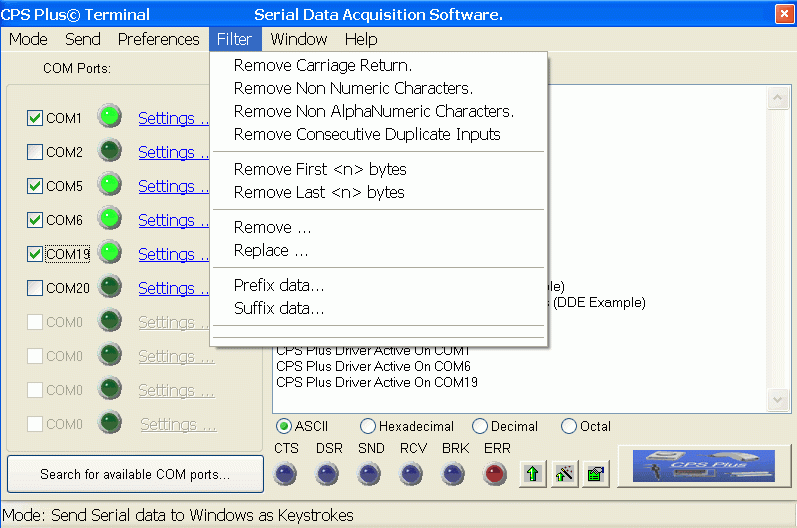
CPS Plus serial data acquisition software enables serial devices like gps receivers, digital scales, magnetic stripe readers, sensors, laboratory instruments, microcontrolers, barcode scanners to communicate with any Windows application. RS232/USB/Keyboard interface.
+ Operates with multiple serial ports simultaneously: COM1, COM2, COM3 ... COM99 - unlimited! Keyboard capture option.
+ Fully configurable data filters, to get data you want from the input strings.
+ Log options: dynamic file mode, keystroke mode, DDE mode (Excel, Access ...)
+ Create charts and graphs in your applications that automatically update with data from your serial devices / instruments.
+ Input real time data into Excel, Access, statistical software ... any Windows application.
+ Automatic Date and Time stamping.
+ Send any ASCII character(s) to serial devices / instruments (communicate with, configure, and transfer data with your serial device without writing any code).
+ Very easy to use.
+ No hardware additions required! No programming required.
+ Low level keyboard filter (for devices with keyboard emulation).
About RS232 Software CPS Plus
This Inventory & Barcoding program is available in English. It was last updated on 29 September, 2026. RS232 Software CPS Plus is compatible with the following operating systems: Other, Windows.
The company that develops RS232 Software CPS Plus is ProgramBL. The latest version released by its developer is 6.5.7. This version was rated by 8 users of our site and has an average rating of 3.5.
The download we have available for RS232 Software CPS Plus has a file size of 2.1 MB. Just click the green Download button above to start the downloading process. The program is listed on our website since 2013-05-24 and was downloaded 376 times. We have already checked if the download link is safe, however for your own protection we recommend that you scan the downloaded software with your antivirus. Your antivirus may detect the RS232 Software CPS Plus as malware if the download link is broken.
How to install RS232 Software CPS Plus on your Windows device:
- Click on the Download button on our website. This will start the download from the website of the developer.
- Once the RS232 Software CPS Plus is downloaded click on it to start the setup process (assuming you are on a desktop computer).
- When the installation is finished you should be able to see and run the program.
